Recruitment MCP Servers Explained: How to Let an AI Agent Run Your Desk Safely
What a recruitment MCP server is, how the secure Lovelio connection works, and the prompts to try on your desk this week.
If you have been reading about AI agents for recruitment and wondering how on earth you let one of them touch your live desk without handing over the keys to the kingdom, this is the piece for you. A recruitment MCP server is the practical answer, and it is simpler than the acronym sounds.
I have spent decades in recruitment tech watching consultants tap away in Bullhorn, JobAdder and half a dozen other systems while promising themselves they would automate it later. Later arrived. Agents can now search your candidates, draft a job, build a shortlist and log a placement. The missing piece for most agencies is a safe way to connect those agents to the ATS without pasting secrets into a chat window. That is what MCP does.
What is a recruitment MCP server?
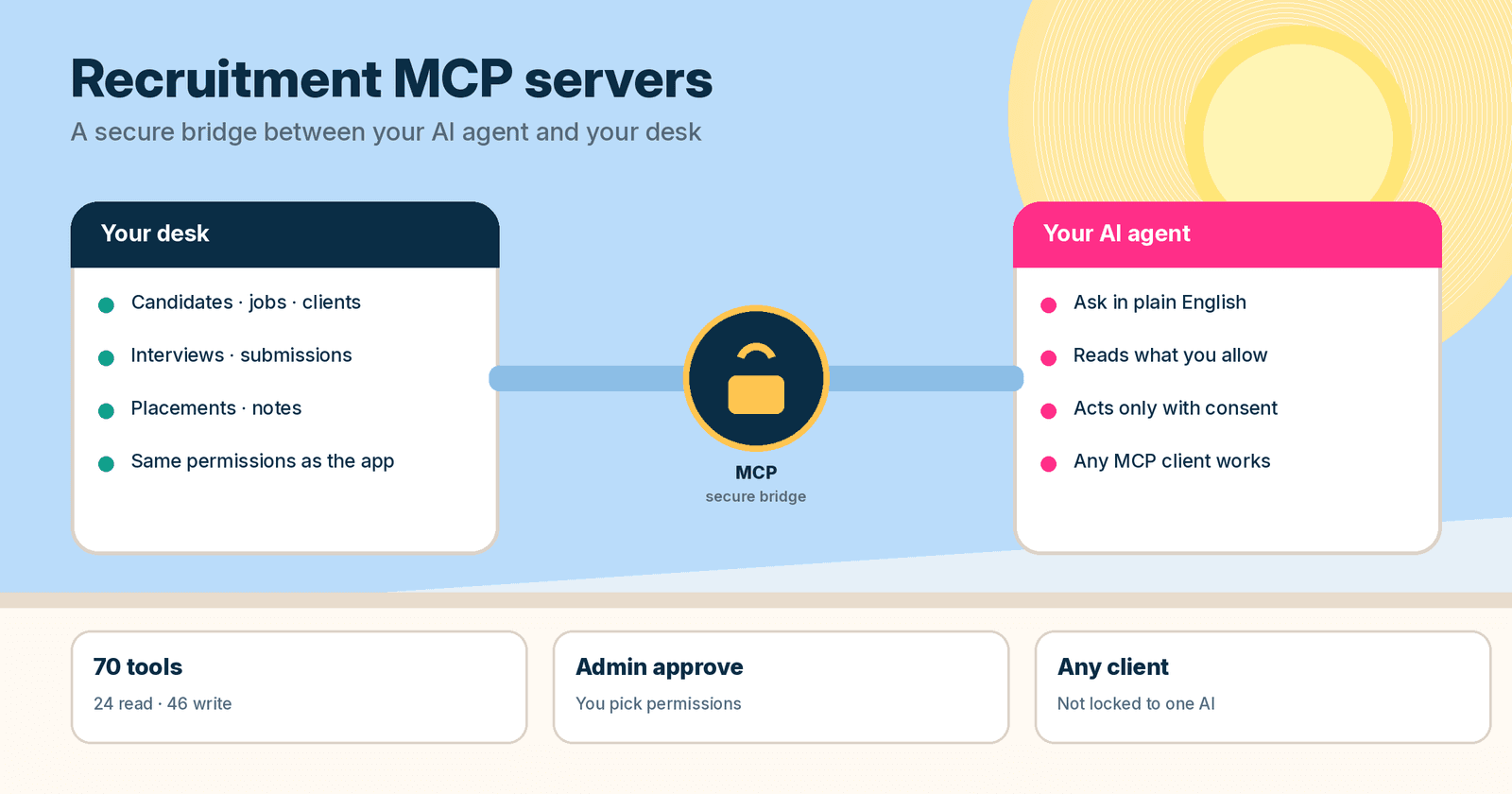
MCP stands for Model Context Protocol. It is an open standard, not one company's product. Think of it as a secure bridge between an AI agent and your Lovelio account. Once connected, the agent can look up clients, jobs, candidates and applications when you ask, and if you approve write permissions, it can act on them too.
Because MCP is a standard, you choose the client. Any desktop app, code editor or agent that speaks MCP can connect to the same Lovelio server URL. Switching clients later changes nothing on our side. Lovelio is not tied to one AI provider. Horses for courses: some people start with Grok Bot, some with Claude, some with OpenAI tools, some with Instinct. Pick what you like using. The recruitment MCP server stays the same.
If you want the deeper product view of why this matters for an ATS, start with What is an agentic ATS? and Every recruiter needs to be an agent orchestrator.
Why agencies care about MCP for recruitment
Most agency owners I talk to do not want another integration project. They want an assistant that already knows their open roles, who applied this week, and which client still has not replied. An MCP for recruitment agencies is how you get that without building custom API glue for every new agent you try.
A few reasons it matters in practice:
- You ask in plain English. The agent picks the right tool. You do not need to memorise endpoint names.
- Permissions are chosen on a consent page, not buried in a config file you forget about.
- No API key is shared with the MCP client in the normal OAuth flow. The agent gets scoped tokens, not your password.
- Every action runs through the same permissions and activity logging as the Lovelio app. An agent cannot do something you could not do yourself.
- You can disconnect at any time from Settings.
If you are weighing MCP against a classic REST integration, I wrote a companion piece: MCP versus API. Which one is right for me?.
How the secure connection actually works
Connecting takes about two minutes once you have an MCP-aware client. Here is the shape of it.
- Sign in as a Lovelio admin. An admin must approve the connection the first time.
- Add the Lovelio server to your AI client. Paste this URL: https://lovelio.ai/api/mcp. It works for every agency, whichever region the workspace lives in.
- Approve the requested permissions on the Lovelio consent page. Clear anything you do not need, then approve.
- Start asking questions. Try something simple like "How many open jobs do we have?"
Your workspace lives in one region: US (N. California), EU (London) or ANZ (Sydney). That is the domain you sign in on. The shared connect URL above routes you correctly. Region-specific URLs also exist if you are wiring an API key into a client that cannot complete OAuth, and those details live in the MCP quickstart.
You decide what the agent can do. Approve read permissions and it can only look things up. Approve write permissions and it can act. Disconnect whenever you want.
What your agent can do on a recruitment desk
On the live docs page, your agent gets 70 tools: 24 that read your Lovelio data and 46 that act on it. You do not need to know the tool names. Ask in plain English and the agent picks the right one. Write tools only work when you grant the matching write permission.
A useful way to think about the catalogue is by the jobs you already do every week:
- Search across jobs, candidates, applications and interviews in natural language, including semantic candidate search with match scores.
- Clients: list and open client records, create or update a client, add contacts, jot Client DNA notes from a meeting.
- Jobs: list and summarise pipeline health, create a job (or turn a plain-language brief into a draft for review), update, close or reopen.
- Candidates and applications: create or update profiles, move stages, reject, withdraw, add notes.
- Interviews: list what is booked, schedule, reschedule, cancel, record outcomes, submit scorecards.
- Submissions: send a shortlist to a client contact, chase a quiet client, answer a question on a submitted candidate.
- Placements and offers: log an offer, record the outcome, create a placement with fee and start date, track guarantee status.
- Talent pools, email and account: pool members, send a candidate email when outbound is enabled, pull activity and account overview.
There is also a batch tool for running many write actions in one round-trip. The full list, including tool names, is on Connect Lovelio to your AI agent.
Real prompts you can try this week
Theory is boring. Here are the sorts of prompts that earn their keep on a live desk. Steal them, tweak the names, and see what comes back.
- "Give me a morning update on our hiring. What happened yesterday and what needs attention today?"
- "Find me senior engineers who applied this week."
- "How is the Product Manager role going? Summarise the pipeline and top candidates."
- "Who are our strongest candidates right now for the Leeds backend role?"
- "What interviews do we have scheduled today, with format and status?"
- "Create a job for Acme: senior backend engineer in Leeds, 80k. Draft the spec and interview plan for me to review before it goes live."
- "Submit the top three candidates on the PM role to the client, with short summaries."
- "Log the placement for Sarah - 95k salary, 20% fee, start date next Monday."
- "Show me the AI assessment for Sarah's application."
- "What happened in hiring today across applications, stage changes and notes?"
Notice the pattern. You stay the boss. Drafts get reviewed. Submissions and placements are things you asked for, not surprises that appear while you were making a coffee.
Safety habits that keep you out of trouble
MCP is designed so an agent works inside the same walls as a human user. Still, treat it like onboarding a sharp new resourcer on day one. A few habits I would put in place before you hand over write access:
- Start read-only for a day or two. Let the agent brief you on pipelines before it moves anyone.
- On the consent page, clear permissions you do not need. You can always reconnect with more later.
- Anything that goes to a client under your name gets your quick yes first. Same rule as a junior consultant.
- Use a dedicated MCP connection per consultant where you can, so activity logs show who asked for what.
- If something feels off, revoke the MCP credential in Settings and the access stops.
- Do not paste long-lived secrets into a chat. Use the consent flow, or a dedicated key in the client's secure header settings if your client cannot do OAuth.
Encrypted storage, short-lived access tokens and refresh expiry are all documented on the MCP docs page. The short version: the bridge is built for agency data, not a weekend hack.
How this fits your week as an agent orchestrator
Connecting a recruitment MCP server is not the whole game. It is the harness. Once the agent can see your desk, you still have to teach it how you work and manage what it produces. That is the orchestrator skill I keep banging on about.
A sensible first week looks like this:
- Day 1: Connect an MCP client you already like to https://lovelio.ai/api/mcp. Approve read permissions only.
- Day 2: Ask for morning hiring updates and pipeline summaries on two live jobs. Check the answers against the app.
- Day 3: Add write permissions for notes and stage moves. Have the agent log call notes and move one application you already decided on.
- Day 4: Let it draft a job from a plain-language brief and prepare a shortlist. You review before anything goes live or to a client.
- Day 5: Hand it a submission or a placement log after you have agreed the outcome. Review the activity log.
- Weekend: Tighten your standing instructions (tone, must-ask screening questions, what "good" looks like on your desk) and pick the next repetitive jobs to delegate.
Start small in your personal life if agents are still new to you, then bring the same habits to work. The tooling is ready. The bottleneck is usually confidence, not capability.
Where to go next
If you want the product docs and the setup blocks:
- Connect Lovelio to your AI agent (MCP) - the main guide, tool list and security notes
- MCP quickstart - config snippets, regions and OAuth detail
- Features and Pricing - what sits around the agent connection
- What is an agentic ATS?
- MCP versus API
- Every recruiter needs to be an agent orchestrator
A recruitment MCP server will not replace your judgement on a candidate or a client relationship. It will stop you spending the best hours of the day copying notes between windows. Connect it, keep the approvals, and put the agent to work on the repetitive stuff you already know how to do with your eyes closed.